> ## Documentation Index
> Fetch the complete documentation index at: https://docs.turntable.so/llms.txt
> Use this file to discover all available pages before exploring further.
# Quickstart
> Setup your analytics stack in 10 minutes
## System Requirements
* Python version 3.10 or 3.11
* Mac (ARM or x64), Windows (x64), or Linux (x64)
## What's Vinyl?
Vinyl is Turntable's framework for developing analytics infrastructure. The only thing you need to know is basic python.
Vinyl is cross-dialect and integrates with your existing data stack. Vinyl can be accessed in places like BI tools, AI agents or data products and works the same if you have 10,000 rows of data or 100M.
Vinyl constructs SQL queries under the hood to avoid pulling all of your data onto your machine and it supports data sources from cloud storage services like S3, databases like Postgres or data warehouses like BigQuery. Vinyl also supports reading from dbt projects. [Learn more about our supported connections](/sources)
## Setup your Environment
```bash theme={null}
pip install poetry
```
First, in a new directory, create a poetry project with Vinyl as a dependency.
```bash theme={null}
poetry init -n --python ">=3.10, <3.12" --dependency vinyl --dev-dependency "vinyl[dev]" && poetry install && poetry shell
```
If you have an existing poetry project, run `poetry add "vinyl[dev]"` and make
sure you're in a poetry shell for the next step.
{" "}
For now, Vinyl projects must also be poetry projects. We're working on adding support
for other package managers.
## Create a Project
```bash theme={null}
vinyl login
```
Now, create a vinyl project with whatever name you'd like. We'll use `my_shop` for this example.
```bash theme={null}
vinyl init my_shop
```
This creates a Vinyl project for you with the following structure:
```
my_shop/
|- models/
|- data/
|- sources/
|- resources.py
```
For the best experience using Vinyl, make sure to change your Python
interpreter to your poetry environment's python. This will provide full
autocomplete, syntax highlighting, and renaming capabilities.
## Generate Sources
Sources are typed data schemas that help Vinyl understand what data is available. Sources can data warehouses (Snowflake, Bigquery), data lakes (Delta), cloud storage (S3, GCS) or even local files. See all of the [supported connections here](/concepts/sources).
Our demo project contains 3 sample csvs from the [Ecuador grocery store dataset](https://www.kaggle.com/competitions/store-sales-time-series-forecasting) under the `data/` folder:
* **stores.csv**: A list of 54 grocery stores and their locations
* **store\_num\_transactions.csv**: The number of transactions at each store over time (2013-2017)
* **holiday\_events.csv**: holiday dates in Ecuador (2013-2017)
First, create a Resource. A Resource serves as your connection to locations where you want to access source data.
Inside `my_shop/resources.py` There's a local resource created for you to work with our local demo files.
```python my_shop/resources.py theme={null}
from vinyl.lib.asset import resource
from vinyl.lib.connect import FileConnector
@resource
def local_filesystem():
return FileConnector(path = "data")
```
We can now generate source files for our upstream data. Use this Vinyl CLI command to generate sources:
```bash theme={null}
vinyl sources generate
```
The result should be 3 files under `sources/local_filesystem/` that map to each csv file:
* **stores.py**
* **holiday\_events.py**
* **store\_num\_transactions.py**
Sources help validate breaking changes, propagate metadata and power development ergonomics like column-level lineage and column autocomplete. [Federated joins](/concepts/sources) are supported for most connectors (ex: BigQuery data joined with Postgres) for data across resources.
Let's a take a look at `stores.py`:
```python my_store/sources/local_filesystem/stores.py theme={null}
from vinyl import Field, source # noqa F401
from vinyl import types as t # noqa F401
from my_shop.resources import local_filesystem # noqa F401
@source(resource=local_filesystem)
class Stores:
_table = "stores"
_unique_name = "local_filesystem.Stores"
_path = "data/stores.csv"
_row_count = 54
store_nbr: t.Int64(nullable=True)
city: t.String(nullable=True)
state: t.String(nullable=True)
type: t.String(nullable=True)
cluster: t.Int64(nullable=True)
```
In just a few lines of python and a `@source` annotation, we get a typed schema, column-level lineage support, powerful autocomplete and query validation across many different SQL dialects and resource types.
Now let's do something with this source data.
## Create a Model
Models are semantic representations of your data. Models can be used in notebooks for analysis, embedded in BI tools or data products and referenced in other parts of your project. Vinyl provides a [wide range of data transforms](/concepts/models) and complex SQL operations out of the box.
We've created some models for you at `models/models.py`. Let's take a look at `top_stores`:
```python models/models.py theme={null}
from vinyl import M, T, join, metric, model
@model(deps=[Stores, StoreNumTransactions])
def top_stores(stores: T, txns: T) -> T:
j = join(store, txns, on = ["store_nbr"])
j.aggregate(
cols = {"num_transactions": j.transactions.sum()},
by = [j.store_nbr, j.city, j.state],
)
j.sort(
by = -j.num_transactions
)
return j
```
Models help you structure and transform data in a declarative way. Upstream data is passed in as plain python functions or classes as dependencies in the `@model` annotation. In this example, we pass in the `Stores` source and `StoreNumTransactions` sources from earlier so we can aggregate the data to find the stores with the most transactions.
This kind of data work usually involves a lot of complex SQL. What makes Vinyl different here is our [pipelined approach](/introduction) to data modeling, a [simple API](/reference) for performing transform operations, and cross-dialect SQL support. You can take the same model code above, change the source from a local file to Snowflake with the same schema and you'll get the same result.
Now, let's preview what this looks like using Vinyl's built-in data preview tool.
```bash theme={null}
vinyl preview model --name top_stores
```
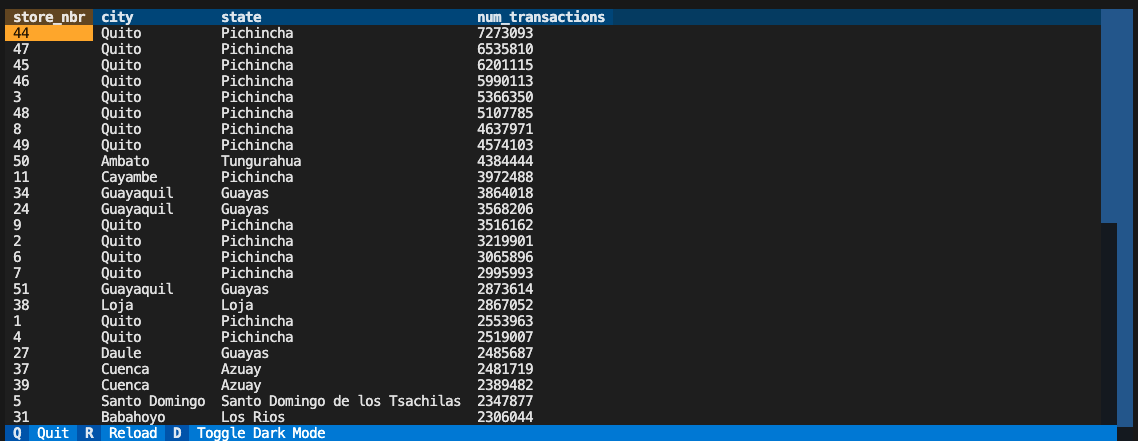 Vinyl's interactive data preview tool works in the terminal and comes in handy when you want to preview changes made to your models.
Let's take a look at another model in our project.
```python models/models.py theme={null}
@model(deps=[StoreNumTransactions, Stores])
def store_txns(txns: T, stores: T) -> T:
table = join(stores, txns, on = [stores.store_nbr == txns.store_nbr])
return table
```
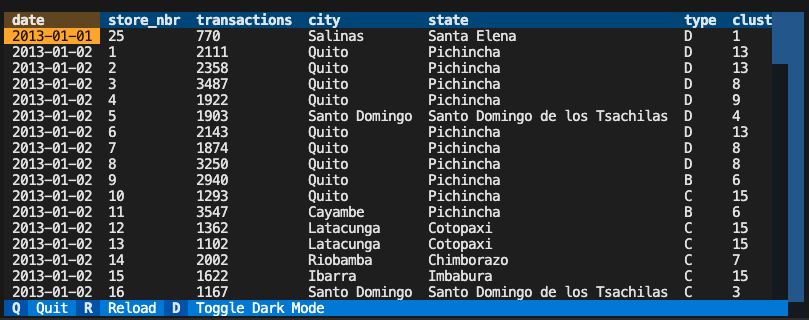
This does a simple join across the two source tables, `StoreNumTransactions` and `Stores`. Let's preview this data using:
```bash theme={null}
vinyl preview model --name store_txns
```
This model contains the number of transactions per day per store, along with some city and state information for each store.
Vinyl's interactive data preview tool works in the terminal and comes in handy when you want to preview changes made to your models.
Let's take a look at another model in our project.
```python models/models.py theme={null}
@model(deps=[StoreNumTransactions, Stores])
def store_txns(txns: T, stores: T) -> T:
table = join(stores, txns, on = [stores.store_nbr == txns.store_nbr])
return table
```
This does a simple join across the two source tables, `StoreNumTransactions` and `Stores`. Let's preview this data using:
```bash theme={null}
vinyl preview model --name store_txns
```
This model contains the number of transactions per day per store, along with some city and state information for each store.
 Time series data is notoriously hard to model. You have to think about time buckets, aggregation windows, missing dates and dimensions. Oftentimes your first guess (weekly sales in the last 30 days) ends up being wrong when someone wants sales data by quarter.
Luckily, Vinyl has a powerful abstraction for handling time series data called **Metrics**.
## Create a Metric
Metrics are a powerful feature in Vinyl that allows for tracking time series data. Metrics auto-generate complicated timeseries SQL for you and can be queried across dimensions and time buckets dynamically.
Create a metric by passing in a `MetricStore` to your function and adding a `@metric` annotation. We'll reference the same `store_txns` model from above.
```python theme={null}
@metric(deps=[store_txns, MetricStore])
def sales_metrics(table: T, metric_store: M) -> M:
metric_store.metric(
cols = {
"total_txns": table.transactions.sum(),
"average_txns": table.transactions.mean(),
},
ts = table.date.cast("timestamp"),
by = [table.store_nbr, table.city,table.state],
)
return metric_store
```
Let's preview our metric using the CLI command:
```bash theme={null}
vinyl preview metric \
--name sales_metrics \
--grain days=7
```
Time series data is notoriously hard to model. You have to think about time buckets, aggregation windows, missing dates and dimensions. Oftentimes your first guess (weekly sales in the last 30 days) ends up being wrong when someone wants sales data by quarter.
Luckily, Vinyl has a powerful abstraction for handling time series data called **Metrics**.
## Create a Metric
Metrics are a powerful feature in Vinyl that allows for tracking time series data. Metrics auto-generate complicated timeseries SQL for you and can be queried across dimensions and time buckets dynamically.
Create a metric by passing in a `MetricStore` to your function and adding a `@metric` annotation. We'll reference the same `store_txns` model from above.
```python theme={null}
@metric(deps=[store_txns, MetricStore])
def sales_metrics(table: T, metric_store: M) -> M:
metric_store.metric(
cols = {
"total_txns": table.transactions.sum(),
"average_txns": table.transactions.mean(),
},
ts = table.date.cast("timestamp"),
by = [table.store_nbr, table.city,table.state],
)
return metric_store
```
Let's preview our metric using the CLI command:
```bash theme={null}
vinyl preview metric \
--name sales_metrics \
--grain days=7
```
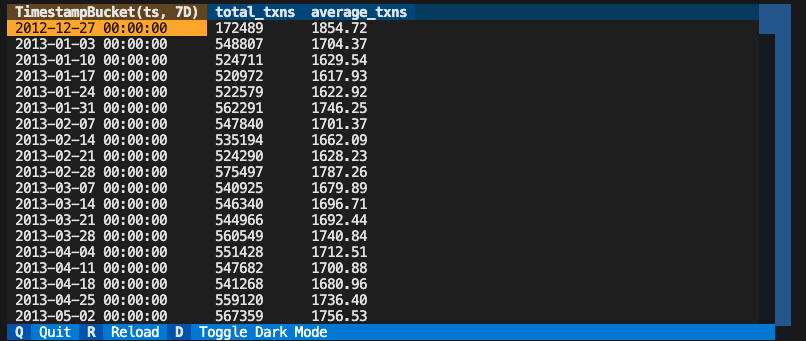 That's pretty neat! In just a few lines of python, you've generated a complicated SQL query to show weekly transaction data that can be sliced across many dimensions and time grains at query time.
Let's try another time grain. Instead of weekly transactions, let's look at monthly transactions:
```bash theme={null}
vinyl preview metric \
--name sales_metrics \
--grain months=1
```
That's pretty neat! In just a few lines of python, you've generated a complicated SQL query to show weekly transaction data that can be sliced across many dimensions and time grains at query time.
Let's try another time grain. Instead of weekly transactions, let's look at monthly transactions:
```bash theme={null}
vinyl preview metric \
--name sales_metrics \
--grain months=1
```
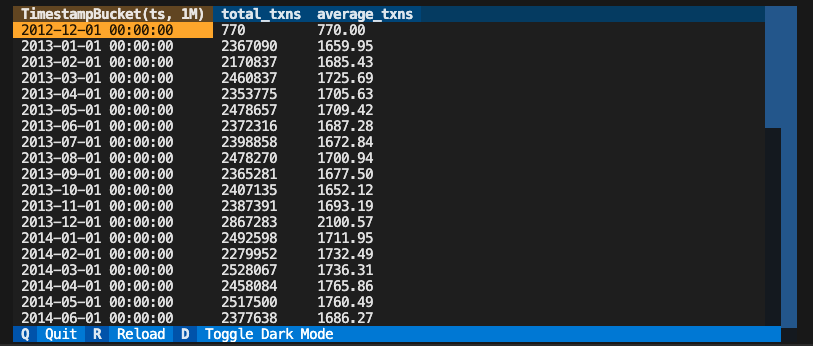 This show us the monthly transactions for each store. To learn more about all of the different time grains and dimensions you can use with metrics, check out the [Metrics documentation](/concepts/models).
## Deployment
While Vinyl is a great data modeling and analysis tool on it's own, it's also designed to be accessed in places like BI tools, AI agents or data products.
You can orchestrate and deploy your Vinyl project using the CLI. By default, Vinyl runs workloads and serves data locally. For production use caes, learn more about our [deployment options](/concepts/deployment).
Let's get our project ready to be served by running the `deploy` command:
```bash theme={null}
vinyl project deploy
```
Vinyl uses the latest query engines and intelligent caching to support sub second queries on 10s of millions of rows of data. Try serving your project using the `serve` command:
```bash theme={null}
vinyl project serve
```
This show us the monthly transactions for each store. To learn more about all of the different time grains and dimensions you can use with metrics, check out the [Metrics documentation](/concepts/models).
## Deployment
While Vinyl is a great data modeling and analysis tool on it's own, it's also designed to be accessed in places like BI tools, AI agents or data products.
You can orchestrate and deploy your Vinyl project using the CLI. By default, Vinyl runs workloads and serves data locally. For production use caes, learn more about our [deployment options](/concepts/deployment).
Let's get our project ready to be served by running the `deploy` command:
```bash theme={null}
vinyl project deploy
```
Vinyl uses the latest query engines and intelligent caching to support sub second queries on 10s of millions of rows of data. Try serving your project using the `serve` command:
```bash theme={null}
vinyl project serve
```
 Once the server starts up, you can serve models and metrics via a Postgres connector or HTTP API call. You can query your deployed Vinyl project in numerous BI and data tools (learn more about [destinations](/concepts/destinations) here).
### Querying your Project using Postgres
Vinyl supports fast sub second queries via its built-in postgres proxy. Connect to your deployed project using a Postgres client like [psql](https://www.timescale.com/blog/how-to-install-psql-on-mac-ubuntu-debian-windows/).
```bash theme={null}
psql -h 0.0.0.0 -p 5433 \
-c "select * from top_stores limit 10";
```
### Integrate your Project with an HTTP API
You can also integrate your Vinyl project with other services or data products. Vinyl supports querying models and metrics via an HTTP API.
```bash theme={null}
curl -H "Content-Type: application/json" \
'http://localhost:8000/metrics/sales_metrics?grain=months=1&limit=10'
```
## Next Steps
Want to learn more about Vinyl? Check out our [concepts](/concepts) and [reference](/reference) documentation.
Have a question for the team or want to learn more about running Vinyl in production? Reach out to us at [team@turntable.so](mailto:team@turntable.so) or join our [Slack community](https://join.slack.com/t/turntable-community/shared_invite/zt-25p0olvhz-Z~c5QWq1jv2YFHQ46mMFDA).
Once the server starts up, you can serve models and metrics via a Postgres connector or HTTP API call. You can query your deployed Vinyl project in numerous BI and data tools (learn more about [destinations](/concepts/destinations) here).
### Querying your Project using Postgres
Vinyl supports fast sub second queries via its built-in postgres proxy. Connect to your deployed project using a Postgres client like [psql](https://www.timescale.com/blog/how-to-install-psql-on-mac-ubuntu-debian-windows/).
```bash theme={null}
psql -h 0.0.0.0 -p 5433 \
-c "select * from top_stores limit 10";
```
### Integrate your Project with an HTTP API
You can also integrate your Vinyl project with other services or data products. Vinyl supports querying models and metrics via an HTTP API.
```bash theme={null}
curl -H "Content-Type: application/json" \
'http://localhost:8000/metrics/sales_metrics?grain=months=1&limit=10'
```
## Next Steps
Want to learn more about Vinyl? Check out our [concepts](/concepts) and [reference](/reference) documentation.
Have a question for the team or want to learn more about running Vinyl in production? Reach out to us at [team@turntable.so](mailto:team@turntable.so) or join our [Slack community](https://join.slack.com/t/turntable-community/shared_invite/zt-25p0olvhz-Z~c5QWq1jv2YFHQ46mMFDA).